

来自 TikTok Shop 官方资料快照 ·
- 当前资料结构化阅读页
- 固定快照已留存,可追溯
- 官方原文可核对
资料正文
§1 [User Manual] TAP: Check Affiliate Links Performance
🌍 For other languages, please see below: [ID User Manual] TAP_ Performa Tautan Afiliasi Kreator.pdf [TH User Manual] TAP_ ติดตามผลการดำเนินงานของลิงก์แอฟฟิลิเอต.pdf [VN User Manual] TAP_ Check Affiliate Links Performance (1).pdf [MY User Manual] TAP_ Jejak Performa Link Affiliate .pdf
§2 Summary
Creators can now share affiliate links on external platforms to boost commissions. As such, it is important for TAP agencies to monitor their creators' affiliate link performances to optimise this new channel of commission generation. With that, we have introduced a new module called Links that allows TAP agencies to quickly grasp creators' overall affiliate links performances. To get a quick refresher of how affiliate links work for Creators, feel free to read the flowchart below:
<div style="text-align: center"><img src="https://p16-arcosite-sg.ibyteimg.com/tos-alisg-i-k9wyc2ijk0-sg/3a750aa0242546cc9f470ddad4cf0d77~tplv-k9wyc2ijk0-image.image" width="2880px" /></div>
§3 Benefits of Monitoring Affiliate Link Performance
- Identify Creators' Link channels with high traffic to guide Creators in optimising the relevant traffic channels to boost commission.
- Easily view overall Affiliate Links attribution towards key metrics like GMV, Orders, Est. Commission and more to understand the effectiveness of affiliate links for Creators.
- Engage with Creators with a custom performance report where you can analyse how Affiliate Links impact different dimensions and form a different affiliate link strategy for each Creator.
Please be aware that the data presented in the below screenshots is not from an actual account and is intended for visual demonstration purposes. Image
§5 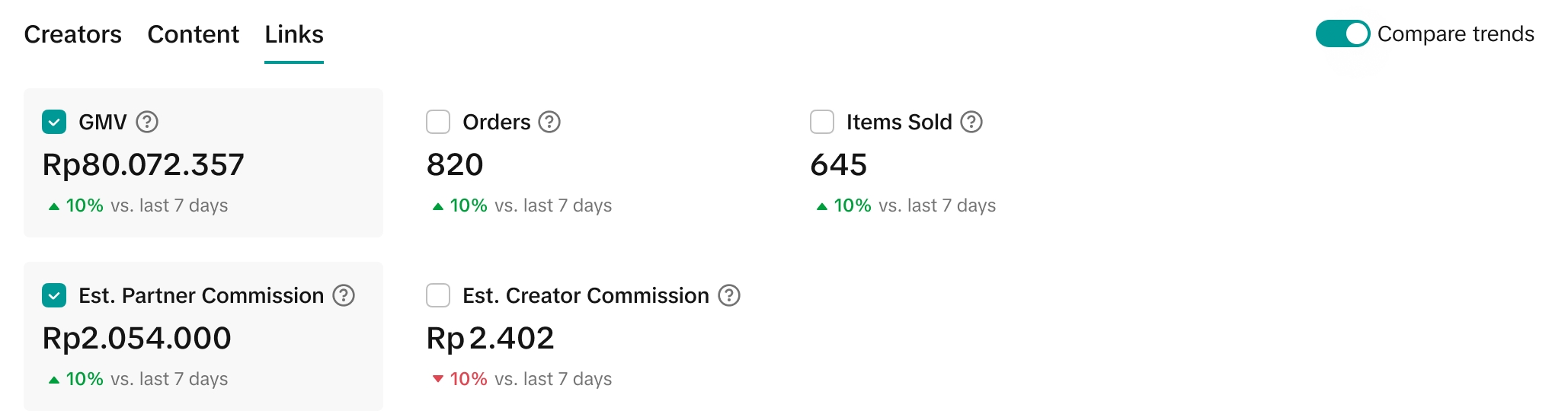
Image
§6 How to Analyse Affiliate Link Performance?
Image
- The Links module will display the following metrics based on the date range selected:
- GMV
- Orders
- Items sold
- Estimated Partner Commission
- Estimated Creator Commission
Image Select up to 2 metrics for comparison and it will be reflected on the trend line chart. Whilst analysing the highs and lows in performance, you can hover on the trend line to zoom into the metric performances on a particular date. Image
§7 How to Export A Custom Report
Navigate to: Partner Centre > Analytics > Custom report
<div style="text-align: center"><img src="https://p16-arcosite-sg.ibyteimg.com/tos-alisg-i-k9wyc2ijk0-sg/8dfbef671ad3486f8141809a1af84deb~tplv-k9wyc2ijk0-image.image" width="2126px" /></div>
§8 How to Export A Custom Report
Navigate to: Partner Centre > Analytics > Custom report Image
- Dimension: Select any of the dimensions below to automatically include affiliate links metrics in the custom report shown. Click Export.
- Campaign
- Creator
- Product
- Shop
- Product Category
Affiliate Link metrics will not be displayed upon selecting the LIVE or Video dimension. For more information on Affiliate Link metrics shown on a custom report, refer to the definitions below.
| Metrics | Definition |
|---|---|
| Link GMV | The total amount paid for orders from affiliate links shared by creators, including returns and refunds. |
| Link Items sold | The total number of items sold from affiliate links shared by creators, including returns and refunds. |
| Link Orders | The total number of paid orders placed from product links creators shared. |
| Link Creator Estimated Commission | The total estimated commission on orders from affiliate links shared by creators. This includes commissions for paid and pending COD orders, non-COD orders, returns and refunds. |
| Link Partner Estimated Commission | The total estimated commission paid to partners on orders from affiliate links shared by creators. This includes commissions for paid and pending COD orders, non-COD orders, returns and refunds. |