

来自 TikTok Shop 官方资料快照 ·
- 当前资料结构化阅读页
- 固定快照已留存,可追溯
- 官方原文可核对
资料正文
§1 How to Link Your TikTok Business Account
In this article, we’ll introduce our latest feature that allows you to connect your TikTok business account in Partner Center to boost your brand, build trust, and streamline creator recruitment. After successfully linking your account, you’ll be able to display official business and partner information—whether you’re a TikTok Shop Multi-Channel Network (MCN) or TikTok Shop Affiliate Partner (TAP)—on your TikTok business account.
§2 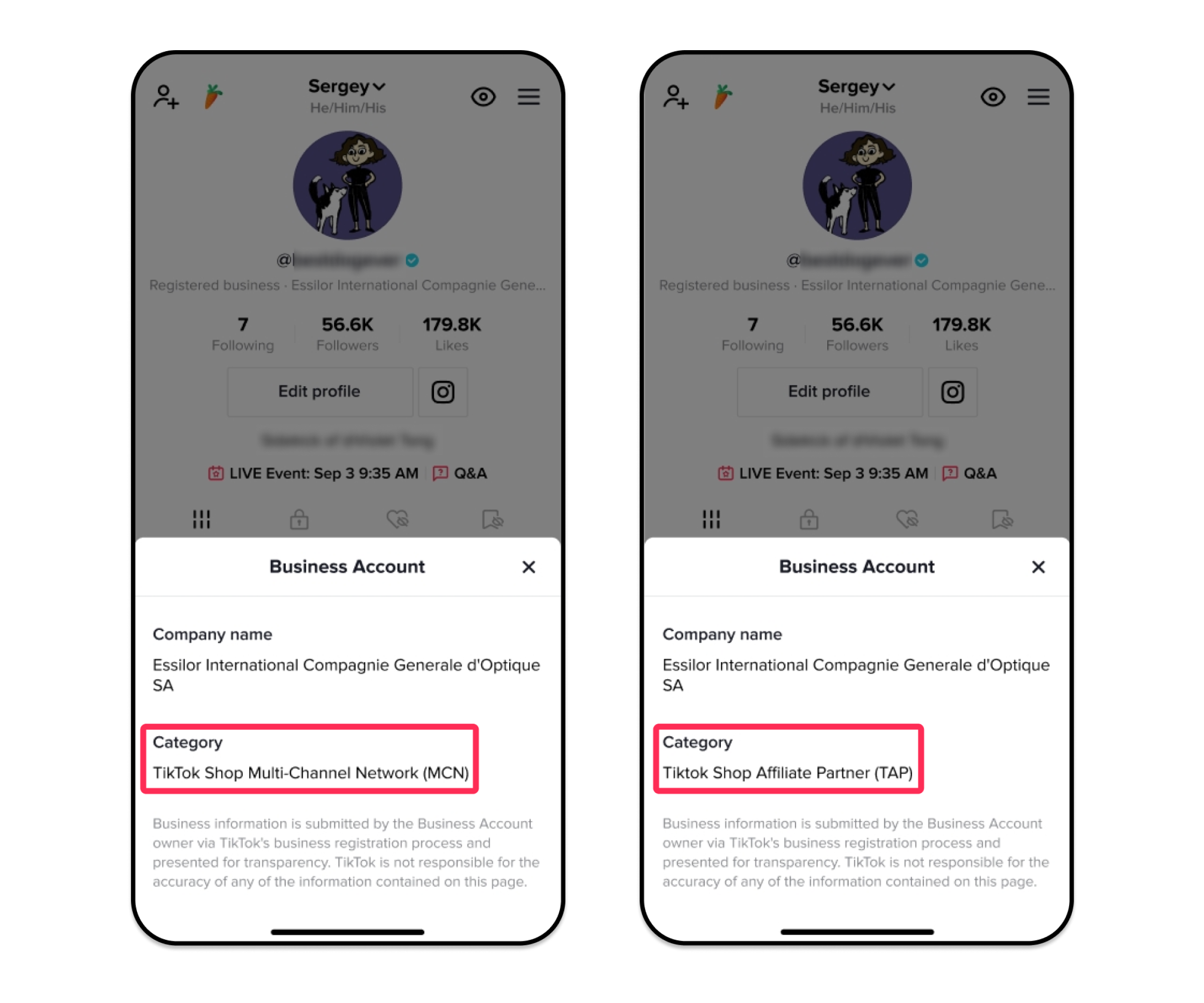
Image
§3 Why You Should Link Your TikTok Account
Why You Should Link Your TikTok Account
<div style="text-align: center"><img src="https://p16-arcosite-sg.ibyteimg.com/tos-alisg-i-k9wyc2ijk0-sg/e99753c394bf4675b75a821538bfc8da~tplv-k9wyc2ijk0-image.image" width="2880px" /></div>
<div style="text-align: center"><img src="https://p16-arcosite-sg.ibyteimg.com/tos-alisg-i-k9wyc2ijk0-sg/34b9d98d9fc24730918da1486150788f~tplv-k9wyc2ijk0-image.image" width="2880px" /></div>
§4 How to Link Your TikTok Business Account in Partner Center
How to Link Your TikTok Business Account in Partner Center
- Go to Partner Center > My Account and click Link TikTok Account.
<div style="text-align: center"><img src="https://p16-arcosite-sg.ibyteimg.com/tos-alisg-i-k9wyc2ijk0-sg/b9bc84abc2f042eab3cc9947498db04c~tplv-k9wyc2ijk0-image.image" width="2880px" /></div>
- Follow on-screen guidance. If you don’t have a TikTok account, click Sign Up for TikTok to create one. If you have an existing account, click Get Started to retrieve your QR code.
<div style="text-align: center"><img src="https://p16-arcosite-sg.ibyteimg.com/tos-alisg-i-k9wyc2ijk0-sg/ed7597a618d742779e00bb8c7635c0f4~tplv-k9wyc2ijk0-image.image" width="2880px" /></div>
- Open TikTok app, go to your profile, tap the top right button, select My QR code, and scan the code in Partner Center and tap Connect Now on TikTok app to complete the process.
<div style="text-align: center"><img src="https://p16-arcosite-sg.ibyteimg.com/tos-alisg-i-k9wyc2ijk0-sg/8594adcf8ee3444690823ad2930eb3f3~tplv-k9wyc2ijk0-image.image" width="2880px" /></div>
❗️Note: Ensure you link the correct TikTok account. If you wish to unlink or change your TikTok account, please contact your account manager.
<div style="text-align: center"><img src="https://p16-arcosite-sg.ibyteimg.com/tos-alisg-i-k9wyc2ijk0-sg/3a54c3e07f4d492da9ac8615d9c96ef3~tplv-k9wyc2ijk0-image.image" width="2880px" /></div>
§5 How to Attach Your TikTok Handle to Your Invitation
How to Attach Your TikTok Handle to Your Invitation
After successfully linking your TikTok business account to Partner Center, you will be able to attach it to your invitations. Creators and sellers will be able to view your TikTok business account through various journeys:
§6 Manage Partnerships
Manage Partnerships
To initiate a binding relationship with creators, go to Manage Partnerships > Add New Creator. On this page, select Attach TikTok profile to include your TikTok handle.
<div style="text-align: center"><img src="https://p16-arcosite-sg.ibyteimg.com/tos-alisg-i-k9wyc2ijk0-sg/25ea5168b85f4c5faf7a51a62df7278a~tplv-k9wyc2ijk0-image.image" width="2880px" /></div>
§7 Find Creators
Find Creators
If you want to invite creators for product collaboration, go to Find Creators > Invite. On this page, select Attach TikTok profile to include your TikTok handle.
<div style="text-align: center"><img src="https://p16-arcosite-sg.ibyteimg.com/tos-alisg-i-k9wyc2ijk0-sg/0c474ce0aa984f429767fa1f151bdd72~tplv-k9wyc2ijk0-image.image" width="2880px" /></div>
§8 Partner Campaign
Partner Campaign
To initiate a partner campaign, go to Partner Campaigns > Campaigns and click Create Campaign. Scroll down to the page to the Social Account section, select Attach TikTok profile to include your TikTok handle.
<div style="text-align: center"><img src="data:image/svg+xml;base64,PHN2ZyB3aWR0aD0iMTAwJSIgaGVpZ2h0PSIxMDAlIiB2aWV3Qm94PSIwLDAsMjAlLDEwMCUiIHZlcnNpb249IjEuMSIgeG1sbnM9Imh0dHA6Ly93d3cudzMub3JnLzIwMDAvc3ZnIiB4bWxuczp4bGluaz0iaHR0cDovL3d3dy53My5vcmcvMTk5OS94bGluayI+CiAgPGRlZnM+CiAgICA8bGluZWFyR3JhZGllbnQgaWQ9ImciPgogICAgICA8c3RvcCBzdG9wLWNvbG9yPSIjRjJGM0Y1IiBvZmZzZXQ9IjI1JSIgLz4KICAgICAgPHN0b3Agc3RvcC1jb2xvcj0iI0U1RTZFQiIgb2Zmc2V0PSIzNyUiIC8+CiAgICAgIDxzdG9wIHN0b3AtY29sb3I9IiNGMkYzRjUiIG9mZnNldD0iNjMlIiAvPgogICAgPC9saW5lYXJHcmFkaWVudD4KICA8L2RlZnM+CiAgPHJlY3QgaWQ9InIiIHdpZHRoPSI0MDAlIiBoZWlnaHQ9IjEwMCUiIGZpbGw9InVybCgjZykiIC8+CiAgPGFuaW1hdGUgeGxpbms6aHJlZj0iI3IiIGF0dHJpYnV0ZU5hbWU9IngiIGZyb209Ii0zMDAlIiB0bz0iMCUiIGR1cj0iMS41cyIgcmVwZWF0Q291bnQ9ImluZGVmaW5pdGUiICAvPgo8L3N2Zz4=" width="2880px" /></div>
T Image i Image is what your sellers will see on the Campaign Details page. They can also click on the TikTok handle to visit your official TikTok account.
<div style="text-align: center"><img src="data:image/svg+xml;base64,PHN2ZyB3aWR0aD0iMTAwJSIgaGVpZ2h0PSIxMDAlIiB2aWV3Qm94PSIwLDAsMjAlLDEwMCUiIHZlcnNpb249IjEuMSIgeG1sbnM9Imh0dHA6Ly93d3cudzMub3JnLzIwMDAvc3ZnIiB4bWxuczp4bGluaz0iaHR0cDovL3d3dy53My5vcmcvMTk5OS94bGluayI+CiAgPGRlZnM+CiAgICA8bGluZWFyR3JhZGllbnQgaWQ9ImciPgogICAgICA8c3RvcCBzdG9wLWNvbG9yPSIjRjJGM0Y1IiBvZmZzZXQ9IjI1JSIgLz4KICAgICAgPHN0b3Agc3RvcC1jb2xvcj0iI0U1RTZFQiIgb2Zmc2V0PSIzNyUiIC8+CiAgICAgIDxzdG9wIHN0b3AtY29sb3I9IiNGMkYzRjUiIG9mZnNldD0iNjMlIiAvPgogICAgPC9saW5lYXJHcmFkaWVudD4KICA8L2RlZnM+CiAgPHJlY3QgaWQ9InIiIHdpZHRoPSI0MDAlIiBoZWlnaHQ9IjEwMCUiIGZpbGw9InVybCgjZykiIC8+CiAgPGFuaW1hdGUgeGxpbms6aHJlZj0iI3IiIGF0dHJpYnV0ZU5hbWU9IngiIGZyb209Ii0zMDAlIiB0bz0iMCUiIGR1cj0iMS41cyIgcmVwZWF0Q291bnQ9ImluZGVmaW5pdGUiICAvPgo8L3N2Zz4=" width="2880px" /></div>
<div style="text-align: center"><img src="https://p16-arcosite-sg.ibyteimg.com/tos-alisg-i-k9wyc2ijk0-sg/4cc3b4ce9c3340fcbc5899eb01b11833~tplv-k9wyc2ijk0-image.image" width="2880px" /></div>
§9 FAQ
FAQ
- Can I link multiple TikTok business accounts to the same Partner Center account?
No, you can only link one TikTok business account to each Partner Center account. If you need to manage multiple TikTok business accounts, you’ll need separate Partner Center accounts for each.
- What happens if I accidentally link the wrong TikTok account?
If you link the wrong TikTok account, you’ll need to contact your account manager to unlink it. Once unlinked, you can go through the linking process again with the correct account.
- What should I do if I encounter an error while linking my TikTok account?
If you encounter an error when linking your account, ensure your TikTok account meets the following criteria:
- The TikTok account holder must be at least 18 years old.
- The status of the TikTok account must be active and have no violation history.
- The TikTok account cannot be a registered business account.
- The TikTok account cannot be linked with another agency or the Creator Network.
If all criteria are met and the error persists, contact your account manager for further assistance.